
01
Audit Overview
Your store's untapped revenue potential — and how to unlock it
Why We Created This Audit
We analyzed https://www.amandean.com the same way we've audited 350+ e-commerce stores — looking for the specific gaps between your current experience and what top-performing Health & Wellness stores deliver. Every finding in this report is a revenue opportunity backed by industry data and competitive benchmarks.
4 Critical
8 Important
2 Opportunities
What We Analyzed
- UX & Conversion Design14 findings
- Performance & Speedvs 4 competitors
- Technology & App StackPlatform + 12 apps
- Industry BenchmarksHealth & Wellness
Pages Analyzed
- Homepage2 findings
- Collection Pages3 findings
- Product Pages (PDP)5 findings
- Cart & Checkout4 findings
 This audit was prepared by Growisto — a CRO-led Website development team behind 167% conversion growth for Atomberg, 46% CR lift for TyresNmore, and 350+ e-commerce projects.
03
UX & Conversion Findings
Page-by-page analysis with visual comparisons against top Health & Wellness stores
No Predictive Search — Users Must Submit to See Any Results
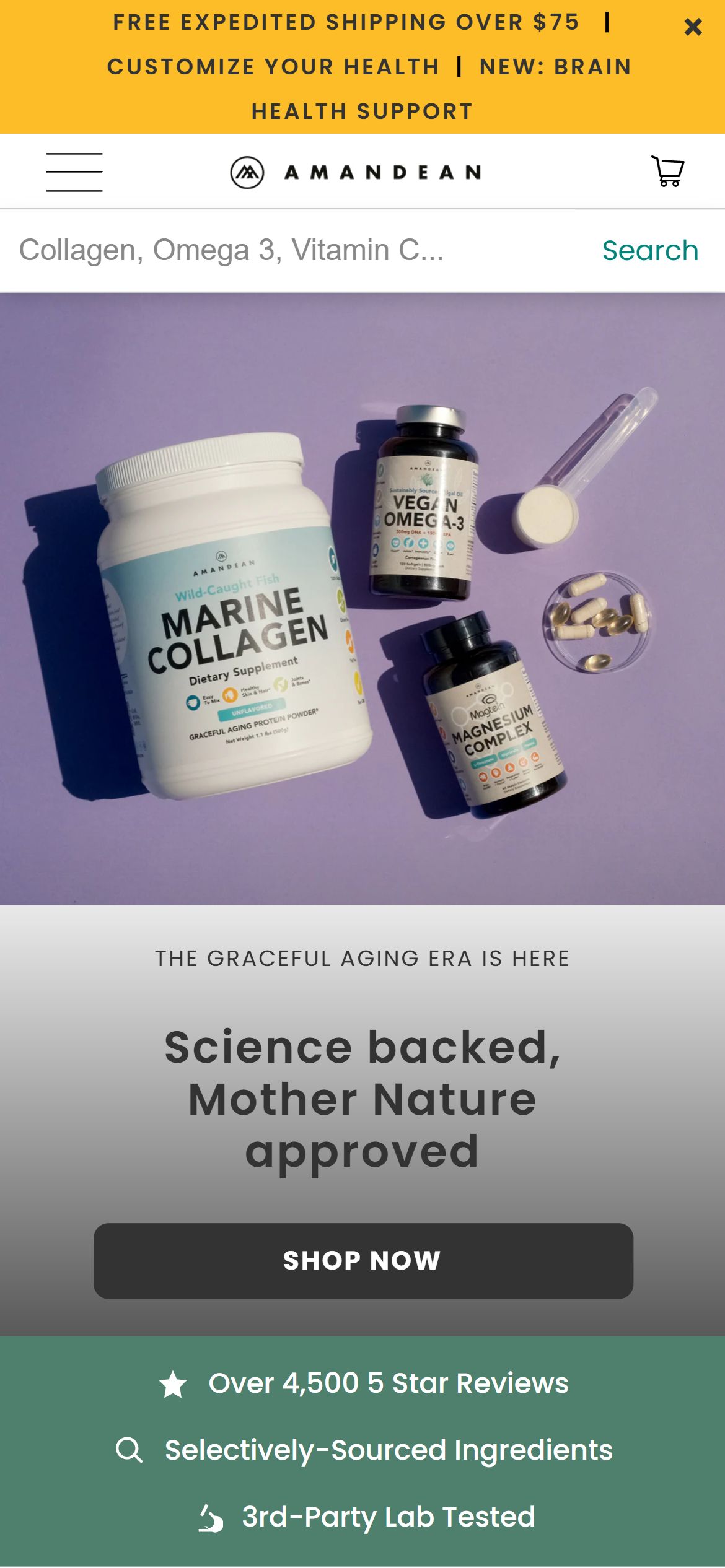
Amandean — No search suggestions on typing
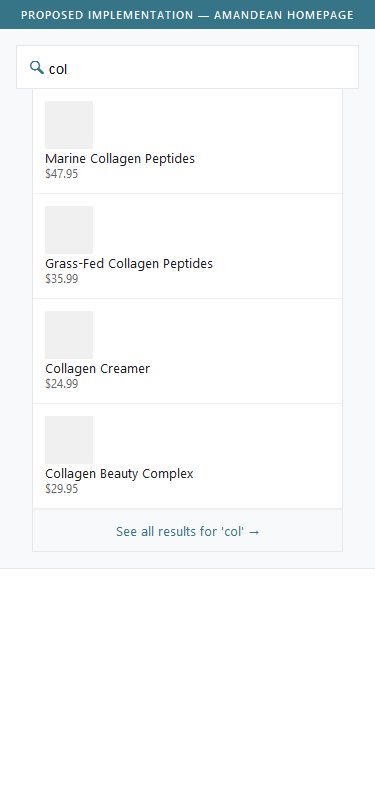
Proposed Implementation — Predictive Search Dropdown
Observations
- Typing 'col' in the search bar produces no dropdown suggestions — the page shows no inline results
- Clicking the search icon submits the query and navigates to a full /search results page (URL: /search?q=col*)
- Users lose context of where they were and must return to the previous page after reviewing results
- Competitors like Vital Proteins and Onnit use predictive search that shows product suggestions instantly while typing
Recommendations
- Enable predictive/live search that shows 4—6 product suggestions in a dropdown as users type (Searchanise, Boost Commerce, or Shopify's native predictive search API)
- Include product image, name, and price in each suggestion row to let users confirm match before clicking
- Add a 'See all results for X' link at the bottom of the dropdown to handle open-ended queries
Email Capture in Footer Offers No Discount Incentive — Low Signup Motivation
Amandean — SMS signup, no discount offer in footer
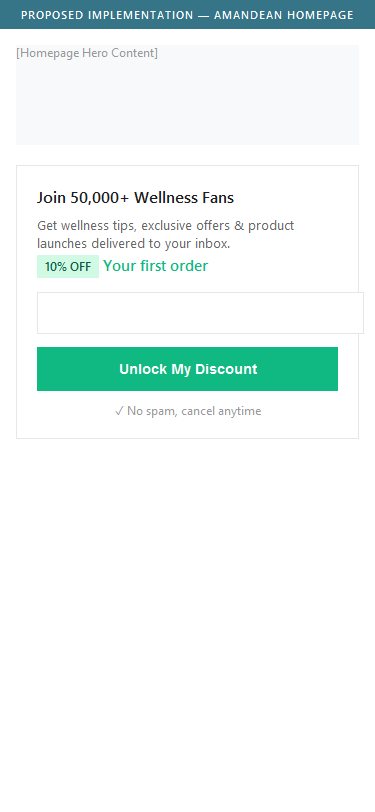
Proposed Implementation — Email Capture with Incentive
Observations
- Footer SMS signup reads: 'Join our Tribe of Superhumans. Get our latest wellness tips, news, & promos delivered by SMS' — no discount or incentive stated
- The Klaviyo email popup (which does offer 10% off) fires on subsequent pages — first-time homepage visitors may miss it before scrolling to the footer
- The footer form captures only a phone number for SMS — there is no dedicated email signup section in the footer with an offer
- Moon Juice and Vital Proteins both lead with a clear incentive ('15% off first order') in their footer email capture
Recommendations
- Add a dedicated email capture section in the footer or homepage body with a clear discount incentive (e.g., '10% off your first order — join 50,000+ wellness fans')
- Ensure the Klaviyo popup fires on the homepage on first visit and is not suppressed for new visitors
- A/B test 10% off vs. free shipping vs. bonus content (supplement guide) as the incentive to find highest-converting offer
No Filter Bar on Collection Page — Users Cannot Narrow Down 40+ Products
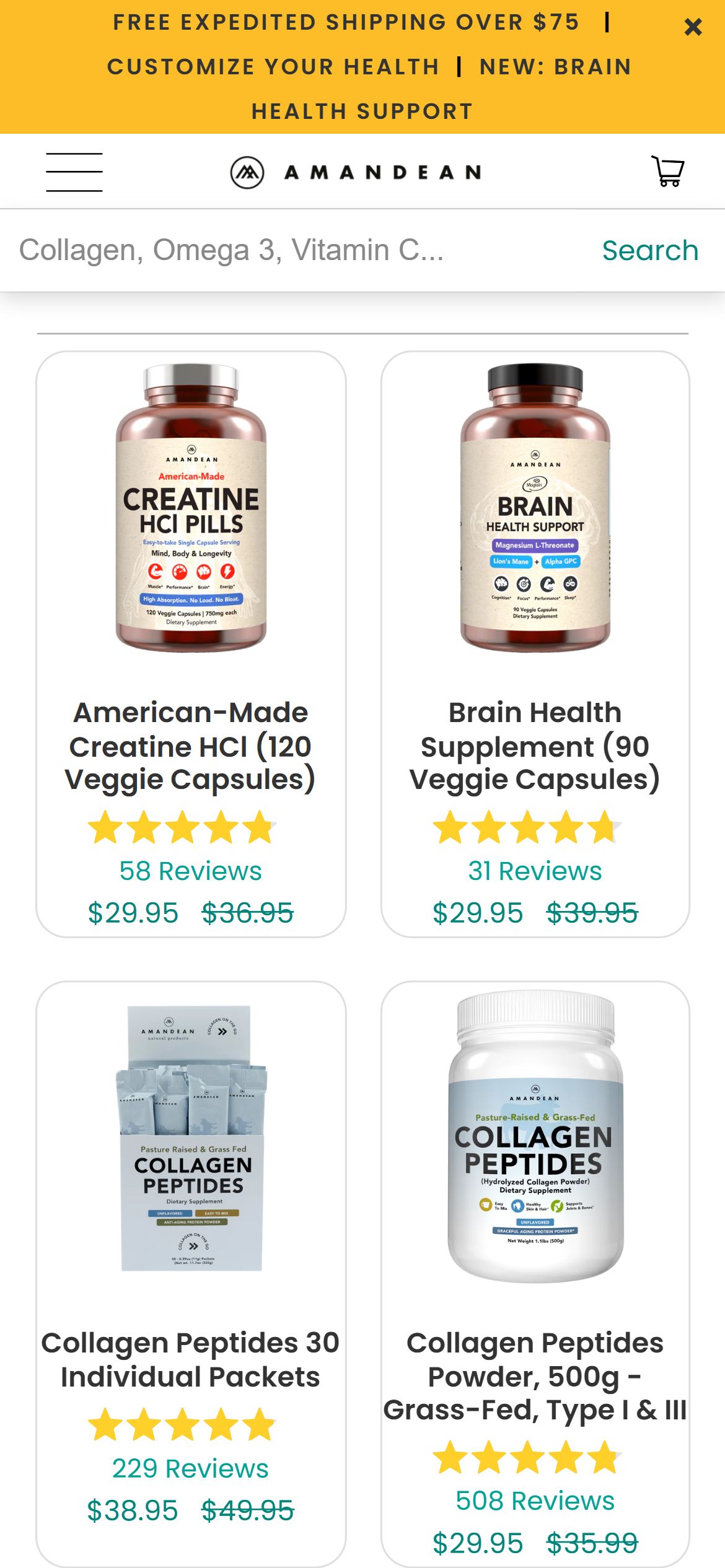
Amandean — No filters on /collections/all
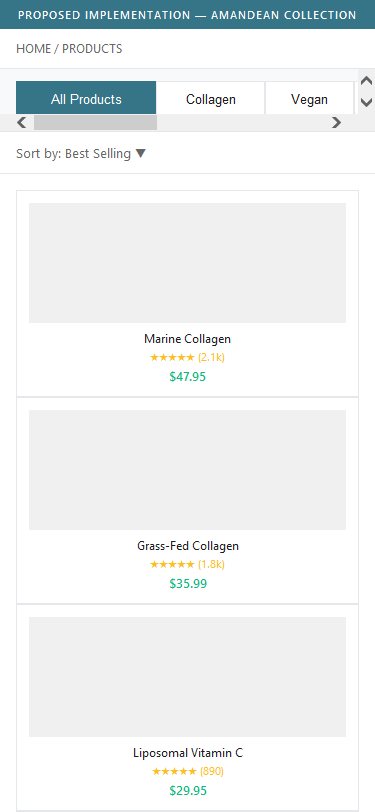
Proposed Implementation — Collection Filter Bar
Observations
- The /collections/all page displays products in a plain 4-column grid with zero filter or sort controls
- No sidebar filters, no top-bar filter dropdowns, no sort by dropdown — only a breadcrumb (HOME / PRODUCTS)
- With 40+ SKUs across collagen, vegan, liposomal, and wellness categories, users have no way to narrow results by type, benefit, price, or availability
- Onnit and Ancient Nutrition both offer filter-by-goal (Sleep, Focus, Gut Health) and price range filters on collection pages
Recommendations
- Add a filter bar with at least 3 filter categories: Product Type (Collagen / Vegan / Liposomal / All), Health Goal (General Wellness, Skin & Hair, Sports Performance, Immune Health), and Price Range
- On mobile, implement a 'Filter & Sort' sticky button at the bottom of the screen so users can access filters without scrolling to the top
- Consider a 'Sort by' dropdown (Best Selling, Price Low—High, Newest, Top Rated) as a minimum viable improvement
No Quick Add to Cart on Product Cards — Extra Click Reduces Purchase Velocity
Amandean — Cards have no ATC button
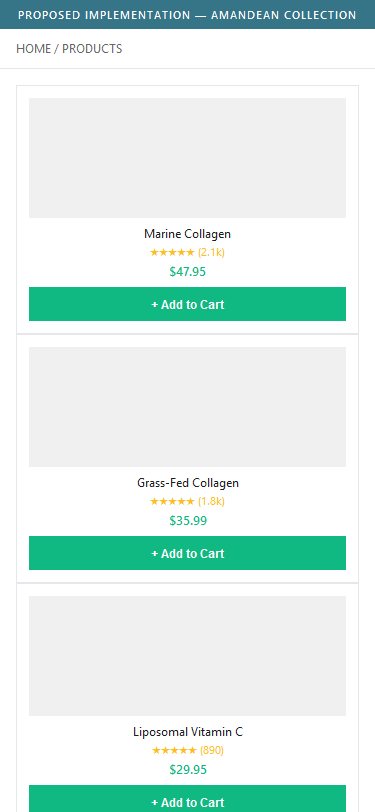
Proposed Implementation — Quick Add on Product Card
Observations
- Product cards on /collections/all show only image, title, star rating, review count, and price — no Add to Cart button
- The only purchase action is clicking the card to navigate to the PDP, which adds one extra step in the purchase funnel
- Cards show no variant information — users cannot see available sizes or formats without clicking through
- Ancient Nutrition and Vital Proteins both show an 'Add to Cart' button on hover/tap on collection cards
Recommendations
- Add a persistent or hover-triggered 'Add to Cart' button on each product card for single-variant products
- For multi-variant products (e.g., Collagen Peptides available in 500g and 1kg), show a size selector on the card or a 'Quick Add' popup with variant options
- Display subscription pricing ('From $43.16/mo with Subscribe & Save') on collection cards — this is a standard across 100% of US health brands reviewed
Subscription Price Not Shown on Collection Cards — Hides Key Value Proposition at Discovery
Amandean — One-time price only on cards
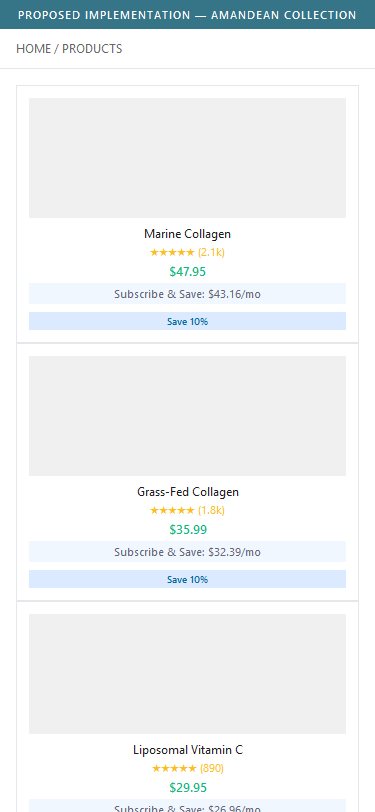
Proposed Implementation — Subscription Pricing on Cards
Observations
- Collection cards show only the one-time sale price ($29.95) and the original price ($35.99) — no subscription pricing is surfaced
- Amandean offers 10% off via Subscribe & Save (powered by ReCharge) but this is not communicated until the user reaches the PDP
- 100% of US health & wellness brands in the benchmark set show subscription pricing on collection cards (e.g., 'From $43.16/mo Subscribe & Save')
- Hiding the subscription discount until the PDP misses an opportunity to attract subscription-intent shoppers during browsing
Recommendations
- Add a secondary price line on collection cards: 'Subscribe & Save: $X.XX/mo' in a smaller font below the one-time price
- Use a 'Subscribe & Save 10%' tag/badge on each subscribable product card to signal the subscription value visually
- Ensure the subscribe option is the default-selected option on the PDP (currently one-time purchase is pre-selected)
Subscription Not Pre-Selected on PDP — One-Time Purchase Default Costs Recurring Revenue
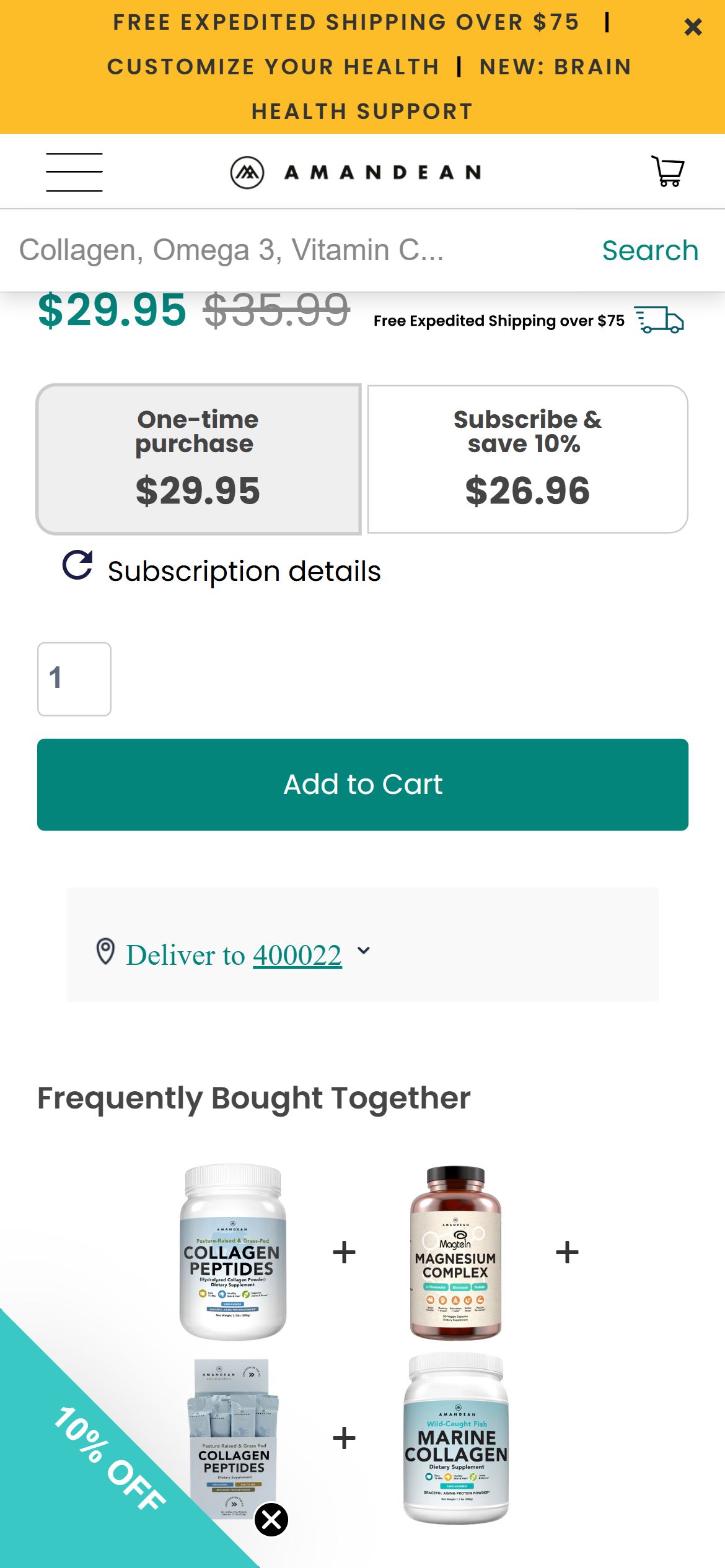
Amandean — 'One-time purchase' is the default selection
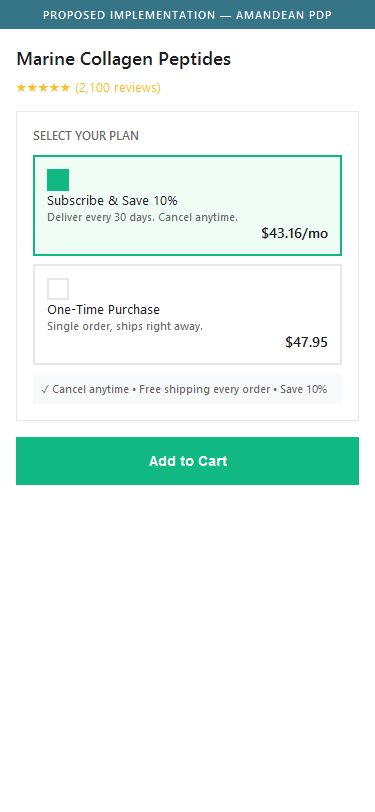
Proposed Implementation — Subscription Pre-Selected on PDP
Observations
- The ReCharge subscription widget on the PDP defaults to 'One-time purchase $47.95' as the active selection — Subscribe & Save 10% ($43.16) is the unselected option
- Every US health & wellness brand in the benchmark (Vital Proteins, Ancient Nutrition, Onnit, Moon Juice) pre-selects the subscription option by default
- First-time buyers who don't notice the toggle add a one-time purchase when they might have subscribed at the lower price if prompted
- Industry data shows subscription pre-selection increases subscription attach rates by 15—25% vs opt-in subscription
Recommendations
- Change the ReCharge widget default to pre-select 'Subscribe & Save 10%' — customers can always switch to one-time if they prefer
- Add a short value-reinforcement line near the subscribe option: 'Cancel anytime · Free shipping every order · Save 10%'
- Consider A/B testing 10% vs 15% subscription discount to find the optimal attach rate vs margin trade-off
No Certification Badges Near ATC Button — Missing Trust Signals at Purchase Decision Moment
Amandean — No certification badges in ATC zone
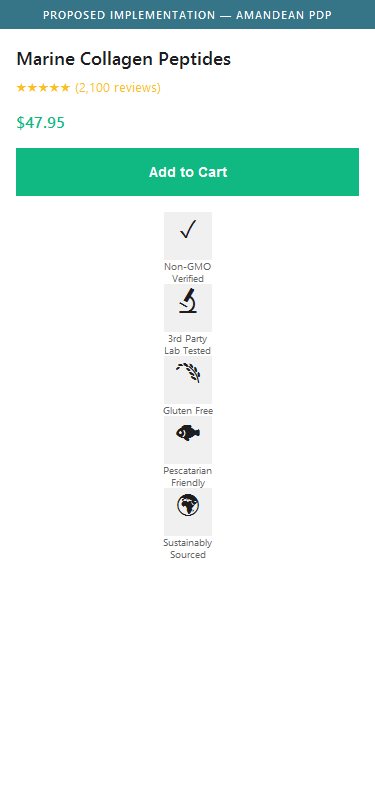
Proposed Implementation — Certification Badges in ATC Zone
Observations
- The ATC zone (between price and the Add to Cart button) contains zero certification or trust badges
- Amandean's products are 3rd-party lab tested and non-GMO — but this is communicated only in the homepage trust bar and in FAQ text, not visually near the purchase button
- 80%+ of US H&W brands display â”°¥3 certification badges (Non-GMO, 3rd Party Tested, GMP Certified, Gluten-Free) within the ATC zone
- First-time supplement buyers look for certification signals before committing — their absence near ATC creates uncertainty at the decision moment
Recommendations
- Add 3—5 certification badge icons directly below the Add to Cart button: Non-GMO Verified, 3rd Party Lab Tested, Gluten Free, Pescatarian Friendly, and Sustainably Sourced
- Use small icon+text badge format (similar to Moon Juice's PDP trust row) — 24px icons in a horizontal row take minimal space
- Ensure badges link to the relevant certificates or testing lab pages for buyers who want to verify claims
No Sticky Add-to-Cart Bar on Mobile — Purchase CTA Disappears When Scrolling Deep Content
Amandean — No sticky ATC bar on mobile PDP
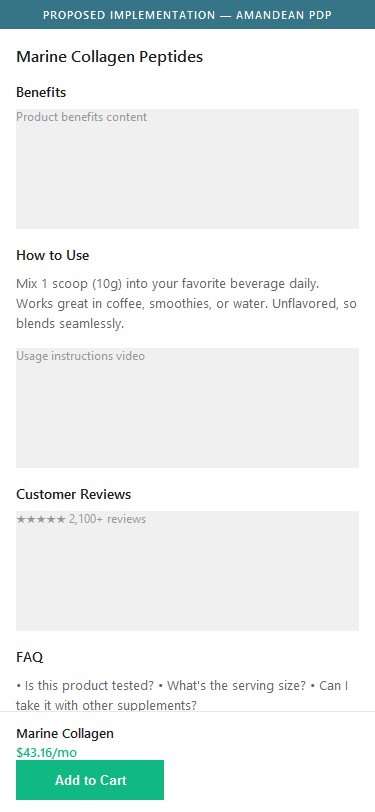
Proposed Implementation — Sticky ATC Bar on Mobile PDP
Observations
- Scrolling past the product image and price section on mobile causes the Add to Cart button to scroll out of view — no sticky/fixed ATC bar appears at the bottom of the screen
- The PDP has substantial content below fold: benefits section, FAQ accordion, video, and reviews — users reading this content cannot add to cart without scrolling back up
- No sticky ATC element is present in the DOM (confirmed via JavaScript audit)
- Industry standard for mobile PDP conversion: sticky ATC bars increase mobile ATC rate by 10—20% by keeping the purchase action always accessible
Recommendations
- Implement a sticky ATC bar that appears when the main inline ATC button scrolls out of view and hides when it comes back into view
- Include the product name, selected variant, price, and an Add to Cart button in the sticky bar — use Shopify's native theme sections or a lightweight custom Liquid snippet
- The sticky bar should NOT show when the main ATC is visible (avoid duplicate CTAs) — toggle visibility based on the inline ATC's scroll position
Supplement Facts Buried in FAQ Text — Not Displayed as Structured Nutrition Panel
Amandean — Supplement facts hidden in Ingredients accordion
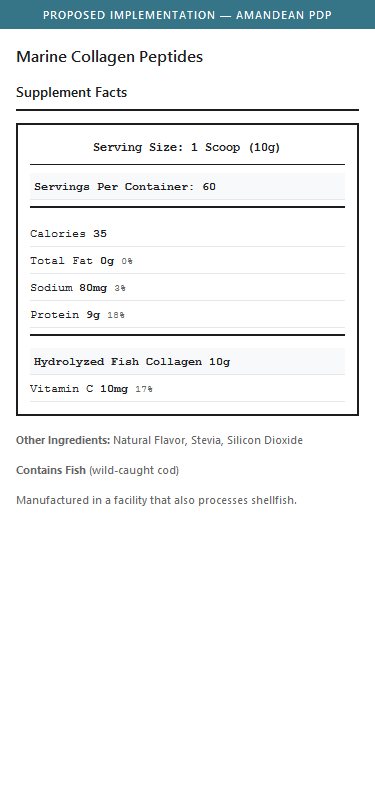
Proposed Implementation — Structured Supplement Facts Panel
Observations
- Supplement facts (Serving Size, Calories, Protein, Sodium, Hydrolyzed Fish Collagen 10g) are buried in an 'Ingredients' FAQ accordion — not displayed as a structured Supplement Facts panel
- The information requires two interactions to access: click 'Ingredients' accordion â” ’ read plain text
- 90% of US supplement brands display a formatted Supplement Facts table as a dedicated PDP section, styled to resemble the actual product label
- Health-conscious buyers expect to quickly scan serving size, macros, and active ingredients — plain FAQ text is not scannable
Recommendations
- Create a dedicated 'Supplement Facts' or 'Nutrition Panel' section on the PDP with a structured table layout (serving size, servings per container, calories, protein, active ingredients per serving, % DV)
- Style the table to match FDA supplement label format — this builds immediate credibility with informed buyers
- Keep the FAQ accordion for additional context but surface the core nutrition panel above the fold or in a prominent dedicated section
Third-Party Lab Testing Claims Not Backed by Visible Badges on PDP — Credibility Gap
Amandean — No certification badge images on PDP
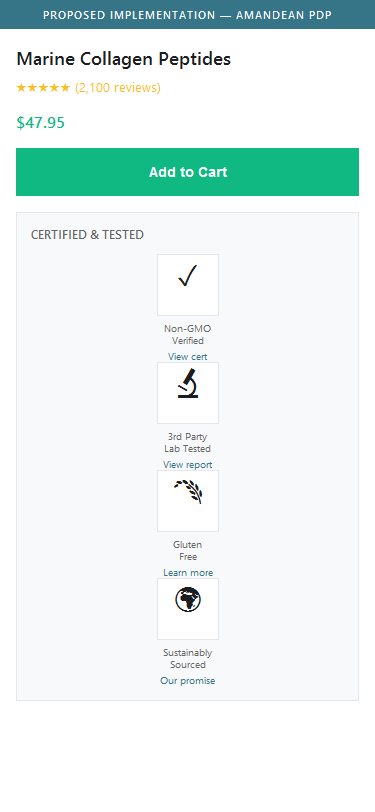
Proposed Implementation — Third-Party Certification Badge Row
Observations
- The entire PDP has zero certification badge images — no NSF, Non-GMO Project, USDA Organic, GMP, Informed Sport, or similar third-party certification logos as visual elements
- Amandean mentions '3rd-Party Lab Tested' in the homepage trust bar (text + icon) but this is never reinforced on the PDP itself
- 80% of US health & wellness brands display at least 4 certification badge images on the PDP, typically in a horizontal row below or near the ATC area
- Absence of visual certification on PDP is a top trust gap for first-time supplement buyers — consumers cannot verify claims without certification logos
Recommendations
- Add at minimum: 3rd Party Lab Tested badge, Non-GMO badge, Gluten Free badge, and Sustainably Sourced badge as visual image elements on the PDP
- Source or create SVG/PNG badge assets for each certification and place them in a dedicated trust row between the subscription widget and the ATC button
- If Amandean has actual third-party test reports, add a 'View Lab Report' link beneath the Lab Tested badge to maximize credibility
No Trust Indicators or Payment Icons Near Checkout Button — Security Gap at Conversion Point
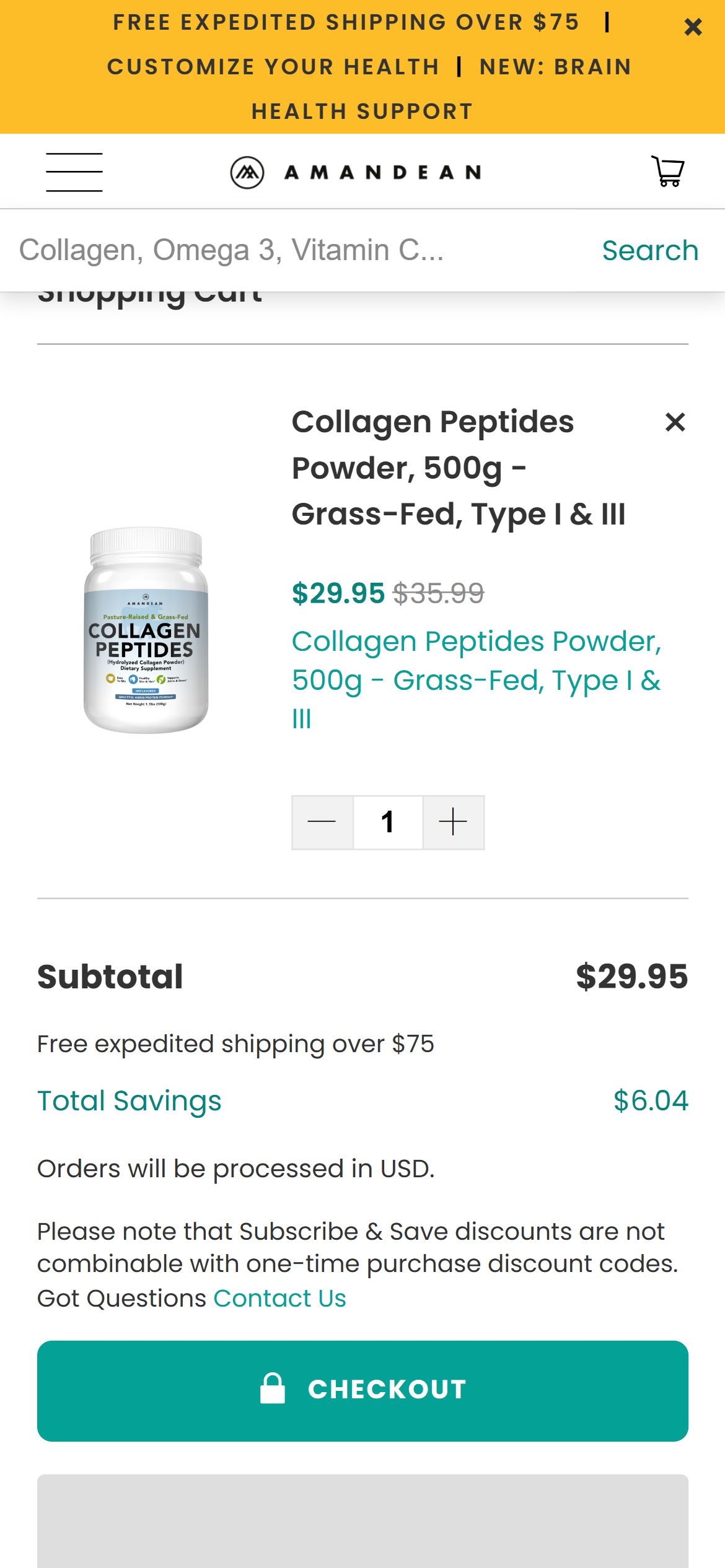
Amandean — Cart checkout with no trust badges
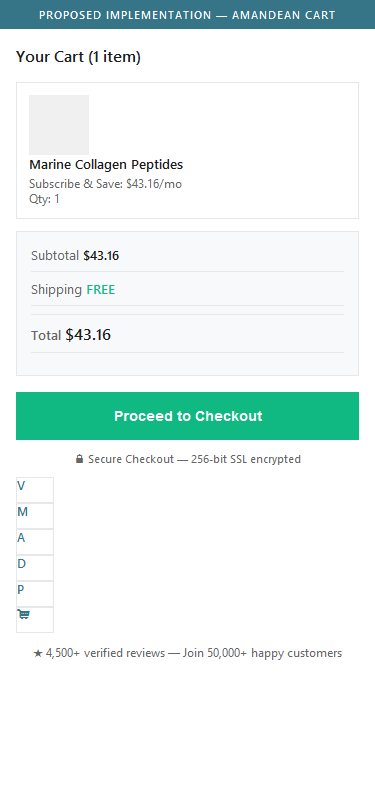
Proposed Implementation — Trust Badges Near Checkout
Observations
- The cart checkout area shows: Subtotal, 'Free expedited shipping over $75', Total Savings, a note about Subscribe & Save, then the Checkout button and PayPal — zero payment method icons or security badges
- Payment method icons (Visa, Mastercard, Amex, PayPal, etc.) are in the footer — far from the checkout action and not visible at cart checkout
- No 'Secure Checkout' badge, no lock icon text, no 'Trusted by X customers' near the Checkout button
- Research shows trust badges near checkout reduce cart abandonment by 7—15% — especially for first-time buyers unfamiliar with the brand
Recommendations
- Add a row of payment method icons (Visa, Mastercard, AmEx, Discover, PayPal, Shop Pay, Apple Pay) directly below the Checkout button
- Add a 'Secure Checkout' line with a lock icon (e.g., '🔒 Secure Checkout — 256-bit SSL encrypted') above or below the Checkout button
- Consider adding '4,500+ verified reviews' social proof line near checkout to reinforce purchase confidence
No Urgency Triggers in Cart — Items Sit Without Purchase Motivation
Amandean — Cart with no urgency signals
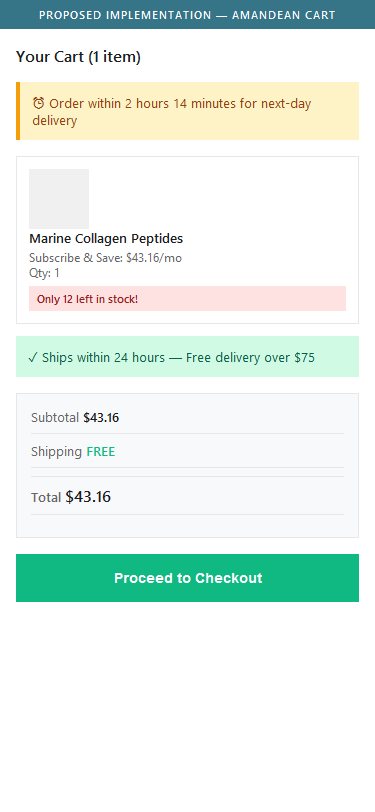
Proposed Implementation — Urgency & Scarcity in Cart
Observations
- The cart page has zero urgency elements — no countdown timer, no 'Only X left in stock', no 'Cart reserved for X minutes', no 'Order within X hours for next-day shipping'
- The cart shows: item, quantity, subtotal, savings, and checkout — no time pressure or scarcity signal anywhere
- High-converting US supplement brands (Onnit, Ancient Nutrition) use 'Items sell out fast — order today' or low-stock indicators to prevent cart abandonment
- Without urgency, shoppers leave carts open indefinitely, leading to higher cart abandonment rates
Recommendations
- Add a 'Low Stock' indicator on popular products when inventory drops below a threshold (e.g., 'Only 12 left in stock' for Marine Collagen)
- Consider a cart reservation timer for high-demand items: 'Your cart is saved for 15:00 minutes'
- At minimum, add an 'Order today, ships within 24 hours' shipping urgency line near the checkout button
No Discount Code Field in Cart — Promo-Motivated Shoppers Hit a Dead End
Amandean — No coupon field in cart
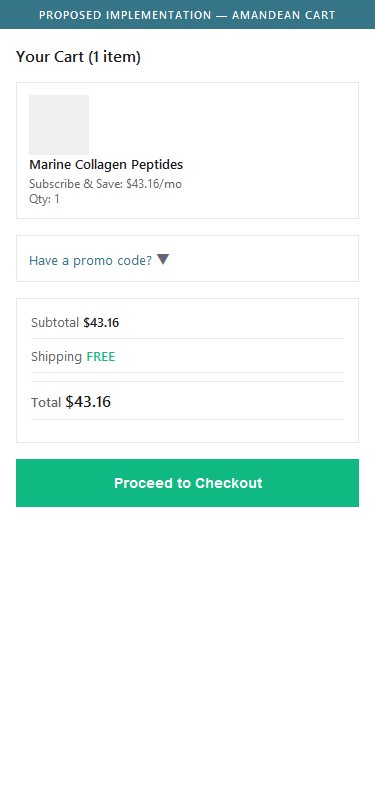
Proposed Implementation — Promo Code Field in Cart
Observations
- The cart page has no discount/coupon code input field — neither an open field nor a collapsed 'Have a promo code?' link
- Customers who receive promo codes via email or social media have no way to apply them in the cart — they must proceed to checkout to find the discount field
- This creates friction for promo-motivated shoppers: they may assume the code is invalid or abandon before finding the checkout discount field
- Moon Juice and Vital Proteins both show a collapsed 'Have a coupon?' toggle in the cart that expands on click
Recommendations
- Add a collapsed 'Have a promo code? Click to enter' toggle in the cart order summary — it should expand to a text input + Apply button on click
- Keep it collapsed by default (not an open empty field) to avoid prompting users to leave and search for codes
- Auto-apply discount codes passed via URL parameters (e.g., from email campaigns) and show the applied discount in the cart summary
Free Shipping Shown as Text Only — No Visual Progress Bar to Nudge Higher AOV
Amandean — 'Free shipping over $75' text only in cart
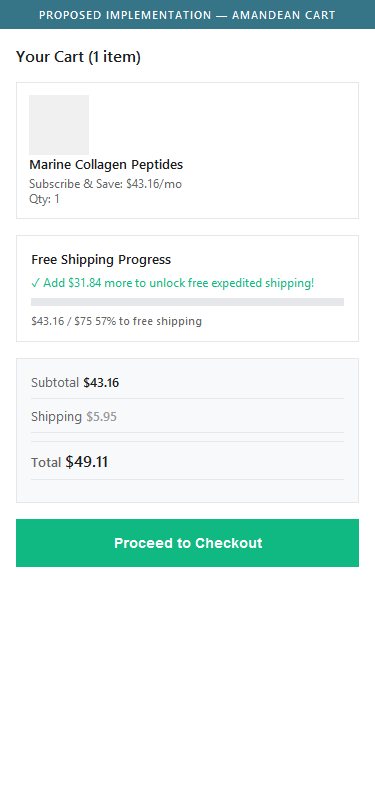
Proposed Implementation — Free Shipping Progress Bar
Observations
- The cart shows 'Free expedited shipping over $75' as plain text in the order summary — no visual progress bar showing how close the user is to qualifying
- A cart with $47.95 shows the text but doesn't tell the user 'Add $27.05 more to unlock free shipping'
- Visual shipping progress bars (e.g., '57% to free shipping — add $27 more') increase average order value by prompting users to add one more item
- Vital Proteins and Onnit both use animated progress bars in the cart to nudge AOV upward
Recommendations
- Add a visual free shipping progress bar above the cart items or in the order summary: show a filled bar indicating current cart value vs. $75 threshold
- Include a dynamic message: 'Add $X more to unlock free expedited shipping!' that updates as items are added or removed
- When the threshold is met, change the bar to '✓ Free expedited shipping unlocked!' with a green confirmation state
04
App Ecosystem
What's installed vs what's missing from best-in-class Health & Wellness stores
Present (12)
ReCharge
Subscription Management
Installed but misconfigured — one-time purchase is the default selection, not subscribe
Rebuy Engine
Recommendations / Upsell
Detected but no cart/post-purchase upsell observed on mobile — verify configuration
Okendo
Reviews & Ratings
Reviews visible on collection cards and PDP — strong social proof
Klaviyo
Email & SMS Marketing
10% off popup confirmed firing; SMS capture in footer
Swym
Wishlist / Save for Later
Wishlist available for guests and logged-in users
Google Analytics 4
Web Analytics
Core funnel + event tracking
Microsoft Clarity
Session Recording & Heatmaps
Heatmaps + recordings active
Hotjar
Session Recording & Heatmaps
Redundant with Clarity — both running adds script overhead
Facebook Pixel
Ad Attribution & Remarketing
Meta Ads conversion tracking
Pinterest Tag
Ad Attribution
Pinterest Ads attribution
Bing UET Tag
Ad Attribution
Microsoft Ads conversion tracking
Quora Pixel
Ad Attribution
Supplementary ad channel
Missing (5)
Search & Filter App (Boost Commerce / Searchanise) Critical
Search & Merchandising / Smart Filters
📈 Resolves HP01 + CP01 — discovery friction across 40+ SKUs
80% of Health & Wellness brands use search + filter apps
Live Chat (Gorgias / Tidio) Critical
Live Chat / Customer Support
📈 Real-time answers to ingredient/dosage questions reduce abandonment
70% of supplement brands offer live chat
Loyalty & Rewards (Smile.io / LoyaltyLion) Critical
Loyalty & Rewards Program
🔄 Drives LTV for non-subscription repeat buyers + referrals
65% of repeat-purchase D2C brands run loyalty programs
BNPL (Afterpay / Klarna / Shop Pay Installments) Recommended
Buy Now Pay Later
💰 Lifts AOV on bundles; reduces price sensitivity above $50
45% of US supplement brands offer BNPL
Post-Purchase Upsell (AfterSell / configure Rebuy) Recommended
Post-Purchase Upsell
💰 One-click upsells convert at 15–25% with zero ad spend
55% of brands run post-purchase upsells
App Stack Assessment
12 apps detected, 5 critical gaps identified
Confidential — Prepared for Amandean by Growisto | June 2026